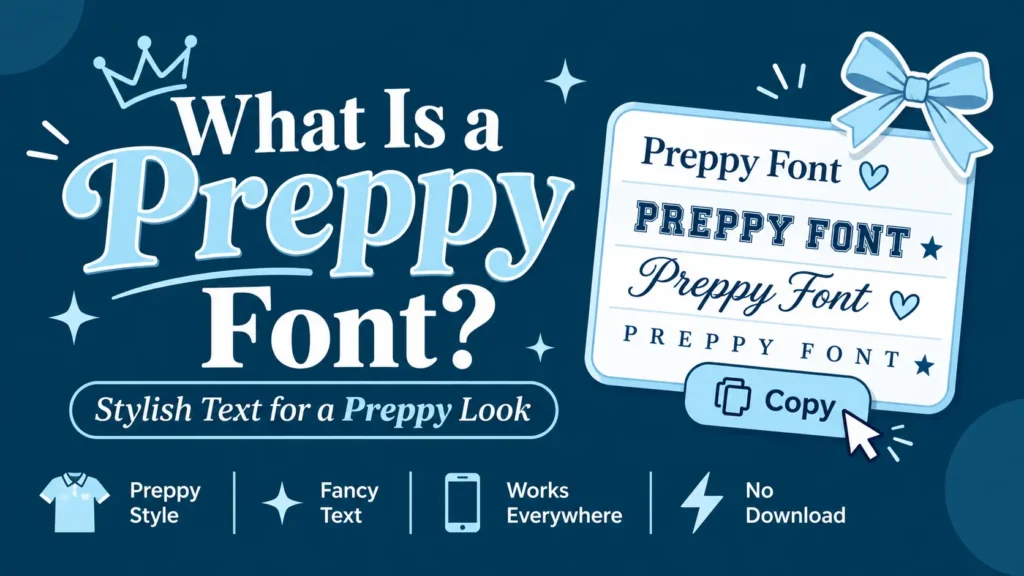
Discover what preppy fonts are, how they create a clean and stylish look, and how to copy and paste them into your favorite social media apps.
Copy or like a font and it will show up here.
What Is a Preppy Fonts?
A preppy font is a text style, made from Unicode characters, that copies the clean and polished
look tied to preppy fashion and culture. The word preppy comes from preparatory, which refers
to the American prep schools that trained students for Ivy League universities like Harvard,
Yale, and Princeton. Over time, this academic and upper class world built its own visual identity
around neat serif letters, varsity style lettering, and soft pastel tones. Preppy fonts borrow that
same visual language and turn it into text you can type, copy, and paste online.
A preppy font generator does not install a new typeface on your device. Instead, it swaps your
normal letters with lookalike Unicode symbols that carry the same preppy feel, such as rounded
serif characters or small decorative marks. This is why the text works right away on an
Instagram bio, a TikTok caption, or a Discord username without any download. It also stays
consistent across apps and websites, because Unicode is a text standard supported almost
everywhere.
How to Use the Preppy Font Generator
Using the preppy font generator takes only a few seconds and does not need any sign-up or
download. You start by typing your text into the input box at the top of the tool. As you type, the
generator shows your words converted into several preppy styles at the same time, so you can
compare them side by side.
Step 1
Type Your Text. Enter any word, name, or short phrase into the input box, such
as a username, bio line, caption, or gaming tag.
Step 2
Choose a Preppy Style. Scroll through the style options and check the live
preview to find the look you want, whether soft and pastel or classic serif.
Step 3
Copy and Paste. Click the copy button next to your chosen style and paste it
directly into Instagram, TikTok, Discord, or any other app.
Preppy Font Styles and Aesthetic Categories
Preppy is not one single look anymore. Over the last few years it has split into smaller
aesthetics, each with its own colors, mood, and now its own matching font style. Below are the
main categories that fall under the wider preppy umbrella, along with the kind of text style that
suits each one.
Pink Coquette and Soft Preppy
The coquette aesthetic started on Tumblr in the 2010s and later grew into a mainstream trend
built around bows, lace, and soft pink tones. It leans on femininity and a playful, delicate mood
rather than the sexualized version the word once carried. For fonts, this style pairs well withrounded, slightly cursive letters and small heart or bow symbols placed around the text. It works
best for Instagram bios, TikTok captions, and usernames aimed at a soft and girly look.
Old Money and Ivy League Serif
The old money aesthetic grew out of the original preppy look and leans on wealth signals
without logos, closer to country clubs, sailing, and Ivy League campuses. It favors muted colors,
tailored basics, and a sense that the look was never bought, only inherited. The matching font
style uses clean serif letters, the kind seen on university crests and formal signage, because
serif text reads as more traditional and established. This category suits bios, captions, or profile
names that want to look refined rather than loud.
Clean Girl and Campus Minimal
The clean girl aesthetic is built around minimalism, slicked-back hair, and a polished but
understated appearance that spread quickly across social media. It is less about decoration and
more about looking effortless, even when the look takes real effort to achieve. The font version
of this category uses simple, narrow letterforms with little to no decoration, keeping the line of
text clean while it still feels styled. This works well for usernames and bios that want a minimal
but intentional look.
Y2K Bubble and Star Girl
This category pulls from early 2000s pop culture, bringing back bubble letters, glitter text, and
playful shapes like stars and hearts. It sits closer to the Y2K revival trend than to classic preppy,
but it shares the same bright, young energy that preppy style often carries. Fonts here use
rounded, bubble-shaped characters, often mixed with star or sparkle symbols around the main
text. It fits captions and usernames meant to feel fun, loud, and nostalgic.
Coastal Granddaughter and Hamptons Prep
The coastal grandmother aesthetic, named after a 2022 trend, borrows from relaxed beach
house living, linen fabrics, stripes, and an unhurried lifestyle by the water. The Coastal
Granddaughter font style adapts that mood using soft script or light serif letters that feel breezy
rather than formal. This matches captions about vacations, beach days, or a slower and calmer
kind of content. It works especially well with cream, white, or soft blue color themes on a profile
or feed.
Where to Use Preppy Fonts
Preppy fonts work anywhere Unicode text is supported, which covers most apps and websites
people use every day. That said, some platforms suit the preppy look better than others, mainly
because of how visible the text is and who sees it. The sections below cover the most common
places people use preppy fonts.
Instagram and TikTok Bios and Captions
Instagram and TikTok bios are the most popular spot for preppy fonts, as a styled bio line
stands out against plain text profiles. Captions also work well, especially short ones, where a full
paragraph in styled text becomes harder to read than a single line or phrase. Highlight titles on
Instagram are another good use, as they are short by nature and get noticed quickly.
Usernames and Gaming Nicknames
A styled username helps a profile or gaming tag stand out in search results, friend lists, and
leaderboards. This is common on Discord, Roblox, and other gaming platforms where players
want their name to look different from everyone else’s. Usernames are short by design, so even
a heavily styled font stays readable, which is not always true for longer text.
Captions and Comments
Beyond bios, preppy fonts show up in comment sections and captions where someone wants a
specific line to catch attention. A styled comment or caption line can work as a small accent
inside an otherwise normal post. This is especially common with short, quotable lines rather
than full sentences, because long blocks of styled text are harder to scan.
Mood Boards, Pinterest, and Aesthetic Posts
Pinterest boards and aesthetic focused posts often use preppy fonts as part of the overall visual
theme, pairing the text with matching colors and images. This is less about one line of text and
more about the font fitting into a wider look, such as a board built around the coastal
granddaughter or old money aesthetics. Creators building a personal brand around a specific
aesthetic often stick to one or two font styles across every post to stay consistent.
Platform Compatibility
Preppy fonts are built from Unicode characters, so they work almost everywhere that accepts
standard text input. Full support is common across social media, messaging apps, and most
modern devices, as Unicode has been a global text standard for decades. A few platforms still
show partial issues, usually tied to older software, certain input fields, or systems that do not
render every character correctly. The table below gives a quick reference for where preppy fonts
work best.
| Platform Type | Examples | Compatibility |
|---|---|---|
| Social Media | Instagram, TikTok, Pinterest, Facebook | Full support for bios, captions, and comments |
| Messaging Apps | WhatsApp, Discord, Telegram | Full support in chats and usernames |
| Gaming Platforms | Roblox, PUBG, Free Fire, Steam | Mostly full support, some username fields may limit character count |
| Search Fields and Forms | Website search bars, sign-up forms | Often blocked or auto corrected, as these fields expect plain text |
| Older Devices and Browsers | Older Android versions, outdated browsers | Partial support, some characters may show as boxes |
Most compatibility problems come from older operating systems or browsers that have not been
updated to support newer Unicode blocks. Search fields and account sign-up forms are also
worth noting, because many of them strip out styled characters during validation. For this
reason, preppy fonts are best kept to visible content like bios and captions, rather than fields
meant for plain data entry.
Key Features
The preppy font generator on this page is built to be fast, simple, and free for anyone to use. It
focuses on a few core features that matter most for everyday use on social media and
messaging apps. These features are listed below.
● Multiple style options. Choose from a wide range of preppy styles, including coquette,
old money serif, clean girl, Y2K bubble, and coastal granddaughter.
● Live preview. See your text update instantly across all styles as you type, with no need
to click a separate generate button.
● One-click copy. Copy your chosen style to the clipboard with a single click, ready to
paste anywhere.
● No sign-up required. Use the tool without creating an account or providing any
personal details.
● Works on any device. The generator runs in a browser and works the same way on
phones, tablets, and computers.
● No downloads needed. The output is Unicode text, so nothing needs to be installed on
your device.
Unicode Text vs Real Fonts
A common question people ask is whether preppy fonts are actual fonts or something else
entirely. The short answer is that they are not real fonts in the traditional sense. Understanding
the difference helps explain both why the tool works instantly and why it has a few limits.
A real font, like Times New Roman or Helvetica, is a file installed on a device that tells the
system how to draw each letter. Websites and apps need that font file present to display text
correctly in that style. Unicode text works differently, because it does not rely on any installed
file at all. Instead, Unicode assigns a unique code to thousands of characters and symbols,
including letters that already look like bold, cursive, or decorative versions of the normal
alphabet.
When the preppy font generator converts your text, it is not applying a font to your letters. It is
replacing each letter with a different Unicode character that happens to look similar to a preppy
style. The characters themselves carry the style rather than a font setting, which is why the text
keeps its look no matter where you paste it. This also explains why some symbols may not
display properly on very old devices, as those devices may not yet support newer Unicode
characters.
Normal Text to Preppy Text
Seeing a few real examples makes it easier to understand how the preppy font generator
changes plain text. Below are some simple before-and-after examples using common words
people search for most. Each one shows the same word converted into a different preppy style.
| Normal Text | Preppy Style Example |
|---|---|
| preppy | 𝓹𝓻𝓮𝓹𝓹𝔂 |
| preppy | Ⓟⓡⓔⓟⓟⓨ |
| hello | 𝐡𝐞𝐥𝐥𝐨 |
| hello | ɦҽɭɭσ |
| bio | 𝙗𝙞𝙤 |
| aesthetic | 𝒶ℯ𝓈𝓉𝒽ℯ𝓉𝒾𝒸 |
These examples only cover a small part of what the tool can produce, as the generator supports
many more styles than shown here. The same word can look soft and cursive in one style, then
bold and clean in another, depending on the aesthetic you want. Typing your own text into the
tool above will show the full range of options available for that specific word or phrase.
Why Preppy Fonts Are Trending
Preppy fonts did not appear out of nowhere, they grew alongside a wider return of preppy and
campus style aesthetics on social media. Over the past few years, TikTok and Instagram have
pushed terms like old money, clean girl, and coastal grandmother into daily use among younger
users. As these aesthetics spread, people started looking for ways to match their text and
captions to the same visual mood as their outfits and photos.
This shift ties back to a broader pattern in online culture, where fashion trends quickly turn into
matching content styles, from color palettes to filters to fonts. Preppy style in particular works
well for this, because it already has a clear visual identity built around serif letters, soft tones,
and a polished look. That makes it easy to translate into text, unlike aesthetics that are harder to
express without images.
Search interest around terms like preppy fonts has grown alongside this trend, as more people
look for a quick way to style their bios and captions to match. The tool itself requires no
download and works instantly, which fits naturally into how people already use social media today.
Speed and convenience matter more here than any technical setup, and that is exactly
what a browser-based generator offers. This is one reason the trend has stayed active rather
than fading out like some other short-lived aesthetics.
Common Issues and Troubleshooting
Even though preppy fonts work on most platforms, a few common problems come up often
enough to explain here. Most of these issues are easy to understand once you know how
Unicode text behaves. The points below cover the most frequent questions people run into.
Letters showing as boxes or question marks.
This happens when a device or app does not
yet support the specific Unicode characters used in a style. It is more common on older phones,
outdated browsers, or apps that have not updated their text rendering in a while. Switching to a
more common style, such as bold or simple serif, usually solves this.
Text not pasting correctly.
Some input fields are built to accept only plain text and will strip out
styled characters automatically. This is common in forms, search bars, and sign-up fields, which
are designed for data entry rather than display. In these cases, the field is blocking the style on
purpose, and no device issue is involved.
Character count looking longer than expected.
Some Unicode characters count differently
than normal letters when a platform checks character limits. This can cause a short phrase to
use up more of a bio or caption limit than plain text would. Trimming the text slightly usually
fixes this without changing the look much.
Font looking different across apps.
While the underlying character stays the same, different
apps use different system fonts to display Unicode text. This means a style can look slightly
thicker, thinner, or spaced differently depending on where it is viewed. This is normal and not a
sign that something is broken.
Best Practices for Using Preppy Fonts
Preppy fonts work best when used with some thought, rather than applied to every piece of text
on a profile. A few simple habits help keep the look clean, readable, and accessible to everyone
viewing it. The points below cover what to keep in mind before using styled text widely.
Keep important text in plain language
Usernames, contact details, or anything people need
to search for should stay in normal text. Styled Unicode characters do not always match
correctly in search systems, as the platform may not recognize them as the same letters. A
styled username or business name could end up harder to find rather than easier.
Avoid long blocks of styled text
A single line or short phrase in a preppy font reads well, but
a full paragraph becomes tiring to read quickly. Long stretches of styled text also slow down
anyone skimming a post or profile, which works against the attention these fonts are meant to
grab. Save the style for short, high-impact lines, such as a bio or a caption opener.
Think about accessibility
Screen readers used by visually impaired users often struggle with
Unicode styled text, because the characters are not standard letters even though they look
similar. This can make bios, captions, or posts unreadable for anyone relying on that
technology. Keeping key information in plain text alongside a styled accent line is a simple way
to avoid locking people out.
Match the style to the context
A coastal granddaughter style fits vacation or lifestyle content,
while an old money serif style suits a more formal or polished profile. Mixing unrelated styles
across one profile can look inconsistent rather than intentional. Picking one or two styles and
sticking with them keeps a profile looking put together.
Conclusion
Preppy fonts bring a clean, campus-inspired look to text, borrowing from a style that has stayed
relevant since the original Ivy League trend decades ago. Whether you prefer the soft tone of
coquette, the formal feel of old money serif, or the breezy mood of a coastal granddaughter,
there is a style here that fits. The generator makes it easy to try out different looks, copy the one
you like, and use it right away on Instagram, TikTok, or Discord without any download or sign-up.
As preppy and campus style aesthetics continue to show up across social media, having a quick
way to match your text to that mood gives your bio or caption a more finished look. Use the tool
above to turn your own text into a preppy style and see which one fits your profile best.
Frequently Asked Questions
A preppy font generator is a tool that converts normal text into Unicode characters styled to
match the preppy aesthetic, such as serif, cursive, or bubble letters. It works instantly in the
browser and needs no download or installation.
Preppy originally referred to the dress and culture of American prep school and Ivy League
students. In fonts, it refers to text styles that borrow the same clean, classic, or campus inspired
look, now extended into related aesthetics like old money and coastal grandmother.
They are Unicode characters, not installable font files. Each styled letter is a separate character
that looks similar to a normal letter, which is why the text keeps its style when pasted anywhere.
Type your text into the generator, pick a style from the options shown, and click the copy button
next to it. The styled text is then on your clipboard, ready to paste into any app or website.
Yes, both platforms support Unicode text in bios, captions, and comments. Styled text displays
correctly in almost all cases, because these apps are built on modern text rendering systems.
This usually happens when a device or app has not updated its support for certain Unicode
characters. Older phones and outdated browsers are the most common cause, and switching to
a simpler style often fixes the issue.
Yes, the tool is completely free and does not require any account, email, or sign-up. You can
use it as many times as you want without restrictions.
No, the text you type is only used to generate the styled preview and copy option. It is not
saved, stored, or sent anywhere else.
Explore More Fonts
Aesthetic Fonts
Cool Fonts
