Convert your simple text into small tiny characters super scripts, subscrips and small caps. Just copy and paste them into tiktok, Instagram, Whatsapp and Facebook.
Small Fonts
Type your text, then tap copy on any style.
About Small & Tiny Font
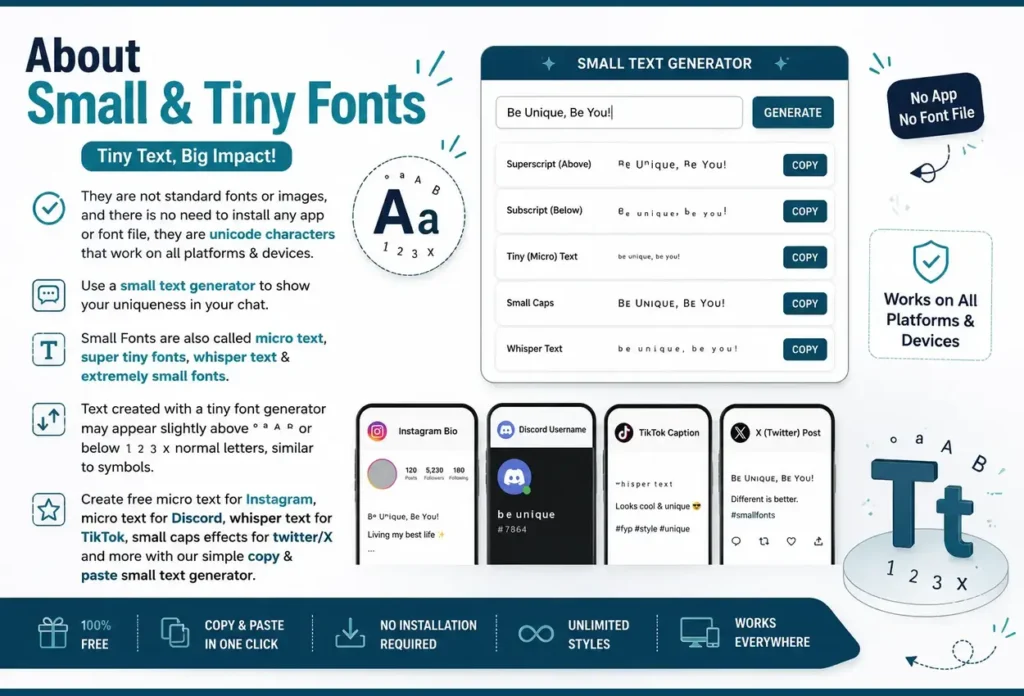
They are not standard fonts or images, and there is no need to install any app or font file, they are unicode characters that work on all platforms & devices. Use a small text generator to show your uniqueness in your chat. Small Font is also called micro text, super Small Font, whisper text & extremely small fonts. Text created with a Small Font generator may appear slightly above ° ª ᴬ ᴮ or below ₁ ₂ ₃ ₓ normal letters, similar to symbols. Create free micro text for Instagram, micro text for Discord, whisper text for TikTok, small caps effects for twitter/X and more with our simple copy & paste small text generator.
How to Use Small Font Generator
Here are the three simple steps below
Step 1
Type your text into the top box
Step 2
Choose your favorite style
Step 3
Copy and the style in your desire platform
Popular Small Fonts with Examples
Superscript (Floating Small Text)
Example: ᴳᵃᵐᵉʳ ²⁰²⁶
Superscript characters appear slightly above normal text and are great for adding small details without taking much space.
Best For:
● Years (²⁰²⁶)
● Edition numbers (²ⁿᵈ)
● References (¹ ² ³)
● Trademark symbols (™)
Small Caps (Miniature Uppercase)
Example: ᴘʀᴏ ɢᴀᴍᴇʀ
Small caps look clean, modern, and easy to read. They are perfect when you want a simple but unique style.
Best For:
● Profile names
● Website headings
● Menu titles
● Brand names
● Portfolio pages
Subscript (Grounded Tiny Text)
Example: H₂O • CO₂ • x₁
Subscript characters appear slightly below normal text and are mainly used in science and technical writing.
Best For:
● Chemical formulas
● Scientific notes
● Math variables
● Research papers
● Educational content
Mixed Tiny Styles
Example: ᴘʀᴏ ᴳᵃᵐᵉʳ₂₀₂₆
Combine different tiny text styles to create a unique and eye-catching design while keeping it easy to read.
Best For:
● Gaming usernames
● Social media bios
● Logo text
● YouTube channel names
● Creative designs
Small Text for Different Purposes
You can use small text for Instagram, Discord as well as personal & work purposes. You can also use tiny text for your presentations, this will grab your audience’s attention. Use the small text generator to create stylish text for greeting cards, notebooks, posters. You can also use these Small Font on Gmail, Yahoo, and modern smartphones, but some email services or older devices may not display every character correctly.
It’s free to use, so you can try different small text styles as many times as you want until you find the one you like. You can also use a whisper font generator for your digital notebook pages or planners. Use the small text generator to make unique captions that help your short videos stand out on social media.
Small Text for Instagram Bio & Caption Tips
Tiny text helps you create the most of Instagram’s 150-character bio limit. Always use small caps for extra details while keeping your main text normal for better readability. This creates a clean, organized bio and lets you include more information without making it look noisy. Use regular text for your main message and tiny text for extra details like ᶜʳᵉᵈⁱᵗˢ, #ᴀꜱʜɪᴏɴ, or ˢᵉᵉ ᵐʸ ᵇⁱᵒ to keep your caption clean, stylish, and readable.
Small Text for Discord Gaming & Community
Small text is a great way to make your Discord profile look unique and easy to read. Always use small caps for usernames like ᴘʀᴏɢᴀᴍᴇʀ, superscript for statuses like ᵒⁿˡⁱⁿᵉ, or tiny text in channel names such as #ᴠɪᴘ, #ᵘᵖᵈᵃᵗᵉˢ, and #ʳᵘˡᵉˢ to keep your server neat, structured, and easy to navigate.
Small Text for Work and Business
Small text gives your work a neat and modern look. Use small caps in email signatures (ᴊᴏʜɴ ᴅᴏᴇ | ᴡᴇʙ ᴅᴇᴠᴇʟᴏᴘᴇʀ), superscript for notes (¹, ²), and subscript for formulas (H₂O, CO₂). You can also use tiny text in LinkedIn headlines, presentations, and reports to organize information while keeping everything simple and easy to read.
Tiny Text Key Factors
| Platform | Compatibility | Best Style to Use |
|---|---|---|
Instagram | ✓ 100% | Small Caps (Bio) / Superscript (Captions) |
Discord | ✓ 100% | Mixed Styles (Usernames & Channels) |
Twitter / X | ✓ 100% | Small Caps (Name & Bio) |
WhatsApp | ✓ 100% | Subscript (Scientific formulas) |
LinkedIn | ✓ 100% | Small Caps (Headlines – Professional look) |
Facebook | ✓ 100% | All Styles |
TikTok | ✓ 100% | Small Caps (Bio) |
Gmail / Email | ◐ 90% | Small Caps (Signatures work best) |
SMS / Text | ⚠ Varies | Small Caps works best on old phones |
Tips for Using Micro Text
You can use small text only for important details, not for the entire message, so your content stays readable. Always mix regular text with micro caps, superscript (¹ ² ³), or subscript (H₂O) to make a neat and organized layout. Before sharing, check how it looks on different devices and pick a style that matches your needs, whether it’s for social media, school, work or gaming.
Use of Tiny Text on Mobile devices
Tiny text works best on almost all modern smartphones, including iPhone, Samsung Galaxy, Google Pixel, and many other Android devices. Small caps (ᴛɪɴʏ ᴛᴇxᴛ) are readable on all screen sizes, while superscript (¹²³) and subscript (H₂O) may look smaller on some phones. Since mobile keyboards cannot type tiny text directly, make it with a tiny text generator, then copy and paste it into apps like Instagram, WhatsApp, Discord, or TikTok. If you’re sharing content with many people, test it on different devices to make sure it displays correctly.
Difference between Small Font and regular fonts
| What We’re Comparing | Regular Font | Tiny Font |
|---|---|---|
| How it works | Software changes how existing characters appear | Letters are swapped for tiny Unicode characters |
| Where it works | Only inside that specific software | Everywhere — Instagram, Discord, WhatsApp, Email |
| What happens on paste | Formatting is stripped, reverts to default size | Stays the same, since it’s a real character |
| Example | 8pt text in Word becomes regular size on Instagram | Tiny text stays tiny after pasting anywhere |
| Why it holds up | Breaks once you leave the original app | Works everywhere using a standard every platform supports |
Frequently Asked Questions
A tiny font generator converts your simple text into small caps, superscript and subscript by using unicode characters.
Superscript text (ᵀⁱⁿʸ ᶠᵒⁿᵗ) appears slightly above normal text. Subscript (ₜᵢₙᵧ ₜₑₓₜ) appears slightly below normal text & small caps appear (ᴡʜɪꜱᴘᴇʀ ᴛᴇxᴛ) are heighted but narrow capital style letters.
Yes, completely free, no sign-up required & no hidden charges. Supported by all modern devices & platforms.
Yes, discord supports unicode characters that’s why you can use small fonts in discord usernames, channel names, chats and status.
Yes, you can mix this tiny text with normal text, mostly people mix it in their instagram posts, whatsapp, tiktok & other platforms.
Explore More Fonts
Calligraphy Fonts
Italic Fonts
Bold Fonts
Inverted Text Generator
Preppy Fonts
Text Decorator
Number Fonts
Twitter/X Fonts
Free Fire Fonts
Instagram Fonts
Fortnite Fonts
Minecraft Fonts
