Use our Bold copy and paste font Generator & convert your simple text into 𝗦𝗮𝗻𝘀-𝗦𝗲𝗿𝗶𝗳 𝗕𝗼𝗹𝗱, 𝙄𝙩𝙖𝙡𝙞𝙘 B𝙤𝙡𝙙, 𝕭𝖔𝖑𝖉 𝖌𝖔𝖙𝖍𝖎𝖈, 𝓑𝓸𝓵𝓭 𝓒𝓾𝓻𝓼𝓲𝓿𝓮, 𝙎𝙖𝙣𝙨 𝙎𝙚𝙧𝙞𝙛 𝘽𝙤𝙡𝙙 𝙄𝙩𝙖𝙡𝙞𝙘 & 700+ Unicode Bold Styles. Just copy & paste into Instagram bios, Tiktok, Discord & more.
Viral Fonts
Definition of Bold Copy and Paste Fonts
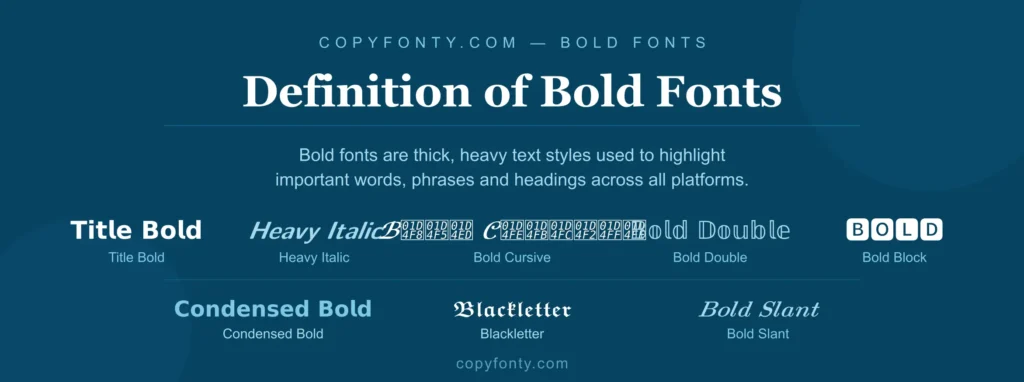
Bold fonts are text styles which are thick and heavy strokes, different from plain text. Bold text generator uses combination of bold unicode characters, enter your text, scroll through all the bold varieties like 𝐓𝐢𝐭𝐥𝐞 𝐁𝐨𝐥𝐝, 𝙃𝙚𝙖𝙫𝙮 𝙄𝙩𝙖𝙡𝙞𝙘, 𝓑𝓸𝓵𝓭 𝓒𝓾𝓻𝓼𝓲𝓿𝓮, and 𝔹𝕠𝕝𝕕 𝔻𝕠𝕦𝕓𝕝𝕖, 𝗖𝗼𝗻𝗱𝗲𝗻𝘀𝗲𝗱 𝗕𝗼𝗹𝗱, 𝑩𝒐𝒍𝒅 𝑺𝒍𝒂𝒏𝒕, 𝕭𝖑𝖆𝖈𝖐𝖑𝖊𝖙𝖙𝖊𝖗, and 🅱🅾🅻🅳 🅱🅻🅾🅲🅺. They are mostly used for phrases, lines & text, to make them highlight.
How does Unicode Bold Text Work?
The Math behind Bold Text
When you use a bold text generator, it does not work in a bold style in Microsoft Word. Instead it swaps your plain text for completely different Unicode characters that look bold. You can copy and paste them into Instagram, emails, and text messages where normal formatting does not work.
The Hidden Cost of Unicode Bold
Unicode bold looks fine but on facebook & linkedin it can hurt your search visibility. It also utilizes more memory, which can reduce your character limit on strict platforms like Twitter. Use Bold copy and paste font only for headlines and short captions, keep your main body content in plain text for better SEO and accessibility.
The Psychology behind Bold Text
Bold text works because our brain naturally notices thick, high-contrast letters before consciously reading any words, eye-tracking studies show people look at bold text first without thinking. This makes bold fonts a powerful tool for grabbing attention, helping readers quickly scan and extract key information without reading everything. Bold text also signals confidence and authority, making brands & content look stronger & more trustworthy. Bold text also helps people with low vision by reducing their eye strain.
Popular Bold Fonts Styles
Bold font styles make text appear thicker and darker. Our Bold copy and paste font generator offers many bold variations using Unicode mathematical symbols, originally designed for scientific notation but now widely used to create stylish bold text anywhere.
𝙄𝙩𝙖𝙡𝙞𝙘 B𝙤𝙡𝙙
It is a slanted version of bold text, it grabs people’s attention on the highest level. Uses for Excerpts, core insights & vital information.
𝗦𝗮𝗻𝘀-𝗦𝗲𝗿𝗶𝗳 𝗕𝗼𝗹𝗱
Smooth to read because it have clean & strong presence, useful where you want to make text grab attention.
𝕭𝖔𝖑𝖉 𝖌𝖔𝖙𝖍𝖎𝖈
It is a dark and dramatic style of bold text, it look like a strong medieval and powerful text. Uses for gaming usernames, dark aesthetic designs & gothic branding.
𝓑𝓸𝓵𝓭 𝓒𝓾𝓻𝓼𝓲𝓿𝓮
It mimic the handwritten styles with thick strokes, it is useful when you want your text to look aesthetic.
𝙎𝙖𝙣𝙨 𝙎𝙚𝙧𝙞𝙛 𝘽𝙤𝙡𝙙 𝙄𝙩𝙖𝙡𝙞𝙘
It is a atlantic version of clean & modern look, Ideal for drawing attention to updates.
On which Platform you can Use Bold text?
Bold text is a unique way to break the visual uniformity on social platforms where everyone uses the same plain font, making your content instantly stand out & stop the scroll. You can use Bold copy and paste font anywhere, from Instagram bios & Twitter posts to emails, group messages, LinkedIn profiles, & captions, simply by generating, copying, and pasting the text. Use it to highlight key words, job titles, calls to action, or important numbers but avoid overusing it, as too much bold may not work well for screen reader users.
Facebook & Twitter/X
Bold text makes your posts stand out on Facebook & Twitter/X by highlighting key points & grabbing attention quickly. Use it wisely, bolding every word loses its impact & looks messy.
Level up your Text on Discord, Whatsapp and PUBG
Bold text is ideal for gamers & chat apps on Discord. It makes your username & announcements emphasise instantly, while on WhatsApp our Unicode bold stays bold even when copied to other apps. For PUBG & Free Fire, use bold italic for your gaming user name to look fast in the lobby.
Bold Copy and Paste Font for Handlings, How they Work?
Bold fonts work best in headings because our brain naturally detects thick, heavy text as important headlines. Use Bold copy and paste font for main headings and subheadings because A/B tests show bold headlines get up to 67% higher read-through rates compared to regular text.
How to use Bold Fonts for Emphasis?
Bold copy and paste fonts work best for emphasis when used sparingly in less than 10% of your text, highlighting only the most important sentence or key point readers must see. For quotes, testimonials, and important statistics, bold fonts make your content more persuasive and convincing.
Use Bold copy and paste Font to get more Clicks
Always bold your main CTA; it is the first thing visitors see, like Buy Now and Sign Up catches attention quickly and can improve click rates by 30 to 50 percent. Since most people skim emails and pages, bold CTAs make sure they never miss the most important action.
Why do Businesses need Bold Fonts?
Bold copy and paste font help in business by making important information easy to find, bold statistics in presentations, deadlines in emails, and offers in ads all grab attention instantly. This saves time for busy readers and can improve click through rates by 20 to 40 percent.
How to use Our Bold Font Generator?
Here are three simple and easy steps below:
Step 1
Type your text into the top box above.
Step 2
Browse through all the styles and choose the one you like.
Step 3
Now copy and paste the styles you choose on your desired platform.
Bold Fonts vs Italic Fonts
| Feature | 𝗕𝗼𝗹𝗱 𝗙𝗼𝗻𝘁 | 𝘐𝘵𝘢𝘭𝘪𝘤 𝘍𝘰𝘯𝘁 |
|---|---|---|
| Nickname | The Shout | The Whisper |
| Purpose | Critical, important info | Subtle stress, gentle emphasis |
| Tone | Assertive, demanding | Soft, suggestive |
| Best For | Deadlines, prices, warnings, key facts | Book titles, foreign words, gentle stress |
| Reader Reaction | Stop and pay attention now | Subtle change in reading tone |
| Use Frequency | Moderate — less than 10% | Moderate — use selectively |
| Overuse Risk | Looks noisy and messy | Loses its subtle impact |
| Example | 𝗦𝗮𝘃𝗲 𝟱𝟬% 𝗧𝗼𝗱𝗮𝘆 | 𝘚𝘢𝘷𝘦 𝘵𝘩𝘪𝘴 𝘧𝘰𝘳 𝘭𝘢𝘵𝘦𝘳 |
How to Use Bold Text, Tips & Mistakes to Avoid?
Mistakes That Kill Your Bold Text Impact
- Bolding Entire Paragraphs: Bolding everything looks messy and hard to read. Bold only the hook or key phrases.
- Ignoring Mobile Optimization: Fancy bold styles like Cursive or Gothic bold are hard to read on small screens. Always test on your phone first.
- Using Bold for Legal or Contact Data: Never bold your address, phone number, or important keywords as search bots may not read Unicode symbols correctly.
- Overusing Bold in Every Post: Using bold text in every single post loses its impact. Save it for when it truly matters.
- Mixing Too Many Bold Styles: Using multiple different bold styles in one post looks messy and unprofessional. Stick to one or two styles only.
More Tips for Better Bold Text
- Test on multiple devices: Check how your bold text looks on both mobile and desktop before publishing.
- Pair bold with regular text: Mix bold and regular text together so the bold parts stand out more effectively.
- Use bold for numbers and statistics: Figures like 50% off or 1000+ users grab attention faster in bold.
- Match bold style to your brand: Use serif bold for elegant brands and sans-serif bold for modern and clean brands.
- Less is always more: Bold only the most important 2 to 3 words in a sentence for maximum impact.
Platform Compatibility Guide, Where Bold Text Works
Frequently Asked Questions
Bold fonts generator is a free online tool that converts your plain text into fonts heaving thick & heavier strokes.
Yes, bold fonts work across all social media platforms like tiktok, whatapp, instagram, discord, facebook & all platforms which support unicode characters.
Yes , bold fonts are perfect for headings because they create hierarchy & grab user attention.
Yes, bold font generator 100% free to use, there is no sign up to needed or hidden charges.
Yes, you can mix bold text with other styles like 𝘪𝘵𝘢𝘭𝘪𝘤 or 𝓬𝓾𝓻𝓼𝓲𝓿𝓮 in the same sentence, perfect for creating eye-catching bios and captions.
